Termetheus app icon

Invite only

An SSH client for the Mac

Termetheus keeps your hosts, keys and snippets in an encrypted vault on your Mac. Terminal tabs, a two-pane SFTP browser and port forwarding share one window.

  • SSH, Mosh, Telnet, serial and local shells
  • Server lists from AWS, DigitalOcean and Azure
  • Macs with Apple silicon

Request an invite

Termetheus is invite-only for now. Leave your email and we'll send you an invite code.

Up to 500 characters0 / 500
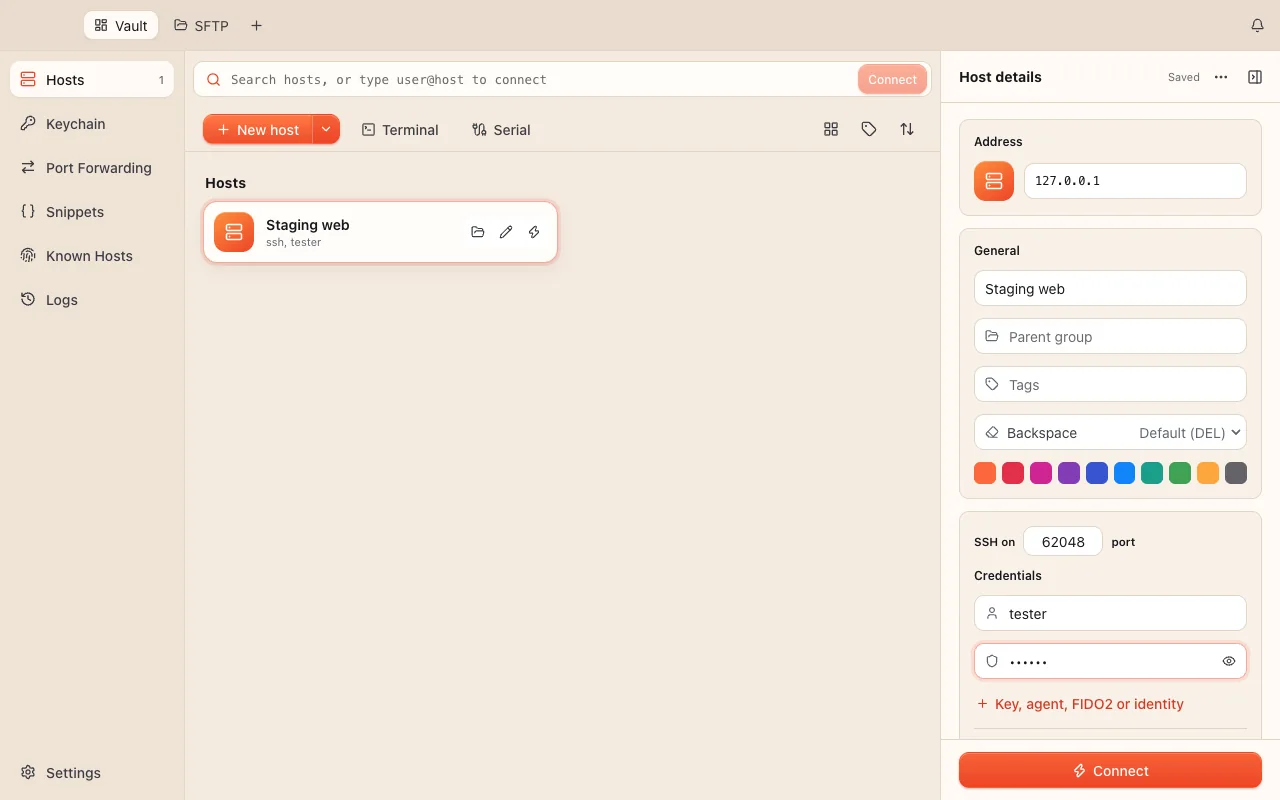
The Termetheus vault in the light theme. A sidebar lists Hosts, Keychain, Port Forwarding, Snippets, Known Hosts and Logs. A host called Staging web is selected, and its details panel shows the address, name, tags, color, SSH port, user name and password, with a Connect button.

Hosts and sign-in

Type to find a host, or type user@host and press Return

Save servers with a label, nested groups, tags and a color. One bar searches the vault and connects: type to filter, or type user@host -p 2222 and press Return. Edits save as you type.

  • Sign in with a password, a key from the keychain, an OpenSSH certificate or ssh-agent, which also covers FIDO2 security keys and Touch ID keys. One-time codes appear as a dialog.
  • Chain through any number of saved hosts, or go out through an HTTP, SOCKS5 or SOCKS4 proxy.
  • Per host: 78 character sets, environment variables, agent forwarding, keepalive, a startup snippet and a terminal theme.
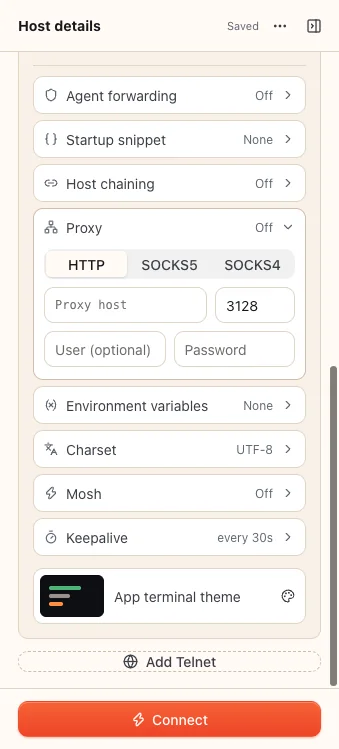
Host details panel with rows for agent forwarding, startup snippet, host chaining, an open proxy section with HTTP, SOCKS5 and SOCKS4 tabs, environment variables, charset UTF-8, Mosh, keepalive every 30 seconds and the terminal theme.

Terminals and workspaces

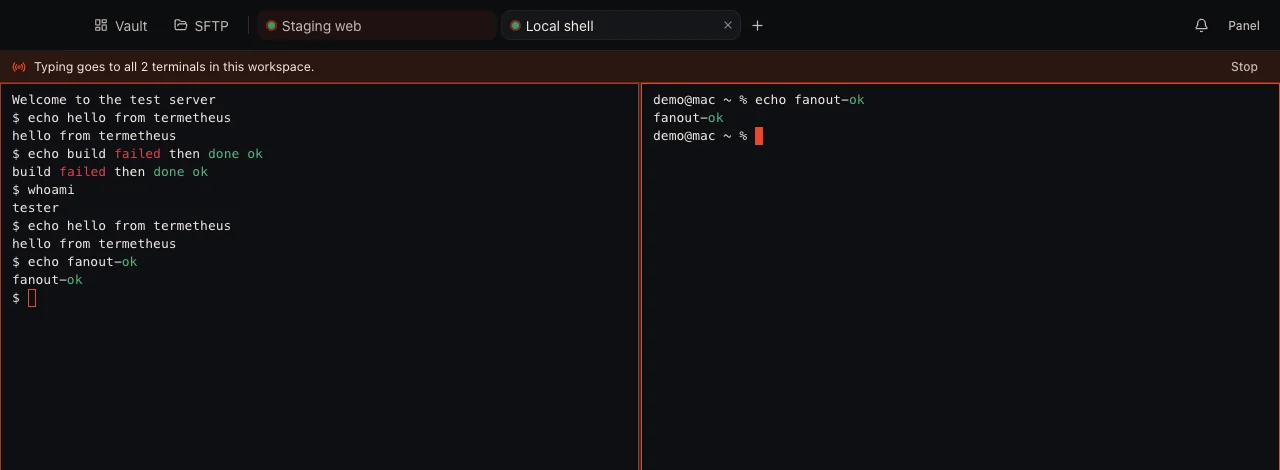
Type once and it runs in every terminal

Drag a tab onto a terminal to show several side by side, stacked or in a grid. ⌘B sends what you type to all of them, and ⌘S saves the set so it opens again from the New tab page.

A tab can be SSH, Telnet, Mosh, a serial port or a local shell. Terminals have find, highlighting for errors, warnings and successes, and 76 color themes. Dropped SSH connections reconnect by themselves.

Mosh is built in, so there is nothing to install on your Mac. Termetheus starts mosh-server over its own SSH sign-in, and can install mosh on a server that doesn't have it.

Two terminals side by side, a test server and a local shell, under a banner that reads: Typing goes to all 2 terminals in this workspace. The word failed is highlighted red and ok is highlighted green.

Cloud groups

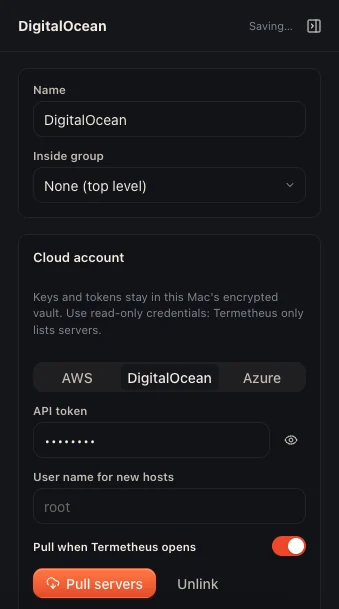
Link a cloud account and the group fills with its servers

Point a group at an AWS account (EC2 or Lightsail), a DigitalOcean token or an Azure service principal. Each pull adds new machines, follows renames and address changes, and removes servers that are gone. Your own edits to each host stay.

Use read-only credentials. Termetheus only lists servers.

Settings for a group called DigitalOcean. The cloud account section has tabs for AWS, DigitalOcean and Azure, a hidden API token, a user name for new hosts, a switch to pull when Termetheus opens, and Pull servers and Unlink buttons.

SFTP

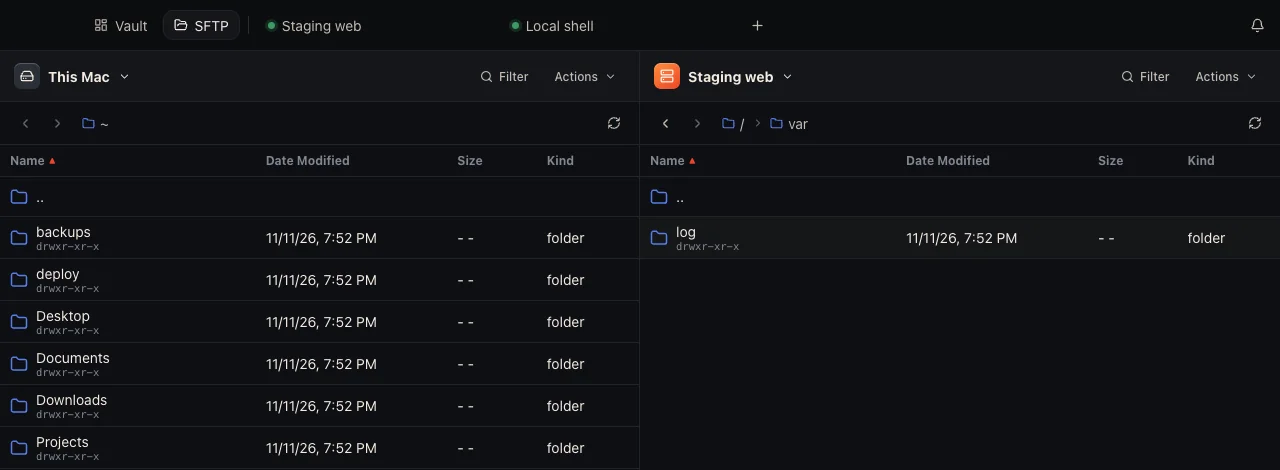
Drag files from one server straight to another

Two panes, each showing this Mac or any saved host, with back and forward, clickable paths, a filter and sorting. Drag between the panes to copy, server to server included.

Create folders, rename, delete and change permissions in the same window.

The SFTP browser with this Mac's home folder in the left pane and the /var folder of a server called Staging web in the right pane. Each pane lists name, date modified, size and kind.

Port forwarding

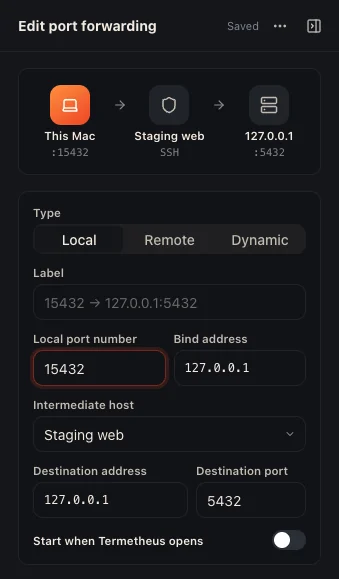
Local, remote and SOCKS tunnels, started with one click

A short wizard sets up each rule and draws its route: this Mac, the server it passes through, and the destination. Start and stop a tunnel with one click, or have it start when Termetheus opens.

Editing a local forwarding rule. A route diagram runs from port 15432 on this Mac through Staging web over SSH to 127.0.0.1 port 5432. Below it are the rule type, label, ports, addresses, and a switch to start the tunnel when Termetheus opens.

Snippets

Run a saved command on one host or on all of them

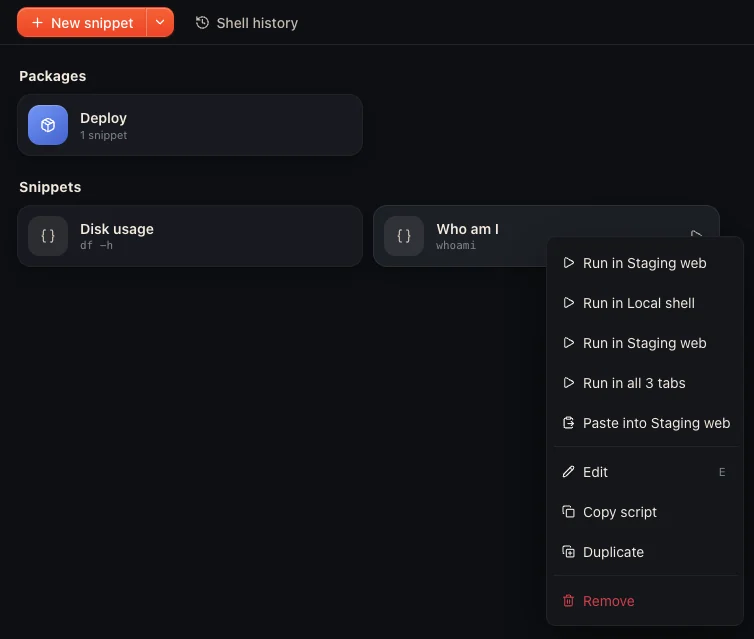
File commands in packages. Run one in the open terminal, in every open tab, at connect time, or on a list of hosts at once.

Shell history collects the commands you've run on every host, and any of them can become a snippet.

The snippets page with a Deploy package and two snippets, Disk usage and Who am I. A menu offers to run Who am I in a single tab, in all 3 tabs, or paste it without running.

Also in Termetheus

Keychain

Generate Ed25519, ECDSA or RSA keys, or import your own, and install a public key in a host's authorized_keys. Attach an OpenSSH certificate to see its principals and validity.

You can also generate post-quantum ML‑DSA keys. Only servers with ML‑DSA support accept them, and OpenSSH doesn't yet.

Import

Bring hosts in from ~/.ssh/config, CSV, SecureCRT, PuTTY or MobaXterm. Folders become groups.

Connection log

Every step of a connection is logged: network, key exchange, host key and each sign-in method. When one fails you can copy the log, edit the host or try again.

Session logs

Each session is listed with how it ended. Turn on transcripts to keep an encrypted copy you can replay.

Shortcuts

⌘T opens a page that searches hosts and open tabs. ⌘P is the command palette, ⌘J jumps to any tab, and shortcuts can be rebound.

Backups

Export the whole vault to a file encrypted with a passphrase you choose.

Your data

Your vault stays on your Mac

Hosts, keys, snippets, forwarding rules, known hosts and history are kept in one file, encrypted with AES-256-GCM. The vault key is sealed with a key kept in your macOS Keychain, so the vault opens only for your macOS user.

Termetheus connects only to the servers you open and, for a group linked to a cloud account, to that provider's API. Nothing else leaves your Mac, and the app sends no telemetry. Accounts for sync are coming, and they will be optional.

  • Connections offer post-quantum key exchange first: mlkem768x25519-sha256 and sntrup761x25519-sha512. Servers without either fall back to curve25519.
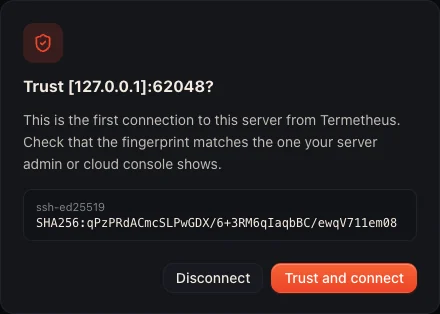
  • The first connection to a server shows its fingerprint and asks you to trust it.
  • If a server's key changes, Termetheus stops the connection and shows both fingerprints.
  • Trusted keys can be imported from ~/.ssh/known_hosts.
The prompt on a first connection: Trust [127.0.0.1]:62048? It explains that this is the first connection to the server, shows the ssh-ed25519 SHA256 fingerprint, and offers Disconnect or Trust and connect.

Coming soon

Not in the app yet

  • Sync and team vaultsSync between your Macs, and vaults shared with a team, through a Termetheus account. Data is encrypted on your Mac before it's uploaded.
  • Shared terminal sessionsWork in the same terminal session with someone else.
  • Public key pageA public page that shows your SSH public keys.
  • AI help with snippetsHelp writing the commands you save as snippets.

Try Termetheus

It runs on Macs with Apple silicon. Ask for an invite, or redeem the code you already have.